
Spring 2026 Start of Semester Faculty Resources
Resources, reminders and information for a successful semester. Please feel free to contact the Office of the Provost if you have any questions.
Contact the Office of the Provost
As we begin the new semester, I want to thank each of you for your continued dedication to our students and to the mission of Texas A&M University. The start of a semester always brings renewed energy to our classrooms, laboratories and offices, and it is a privilege to work alongside faculty and staff whose commitment to teaching, discovery and service shapes the next generation of leaders.
Simple Syllabus
Course syllabi must be provided to students no later than the first day of your class.
Earlier this week, my team relayed new information on Simple Syllabus. Simple Syllabus is a university-supported software tool that faculty members can use to create and share course syllabi. It is an easy-to-use software tool that simplifies syllabus creation, promotes accessibility and ensures alignment with university and state policies. It is available for faculty to use voluntarily starting this Fall 2025 as a pilot semester.
Simple Syllabus is a university-supported software tool that faculty members can use to create and share course syllabi. It is easy-to-use, simplifies syllabus creation, promotes accessibility and ensures alignment with university and state policies. Fall 2025 was the pilot semester and faculty will be required to use Simply Syllabus starting Fall 2026.
This tool will be available in Canvas and on the public facing Texas A&M Simple Syllabus webpage beginning Friday, Aug. 8, 2025. The Simple Syllabus Instructor Guide contains written instructions on how to use the platform and can be found on the LMS/Third-Party Tool webpage for Simple Syllabus. The base template includes the Minimum Syllabus Requirements previously approved by the Faculty Senate. More information on syllabus requirements and training opportunities.
Instructor Curriculum Vitae Requirements
A curriculum vitae (CV) for all instructors is required to be posted online no later than 1 week after the first class day. In order to upload your CV, you can go directly to the “CV Uploader” tool (login to Howdy required), or go to Howdy and locate the “CV uploader tool” by typing CV” in the search bar. The uploader will appear in the drop-down menu. Follow the instructions to upload a pdf version of your CV.
During the spring 2026 semester, we will be piloting the use of Simple Syllabus for generating Faculty CVs to ensure compliance with House Bill 2504. The contents of which will be automatically pulled from Interfolio and internal data sources directly into a template to ease the amount of work required for faculty at the start of the semester. More information and a start date will be announced soon.
Syllabus Course Review & SB 412 Best Practices
Student Observances for Religious Holy Days
In accordance with Texas Education Code §51.911(a) and Texas A&M University Student Rule 7: Attendance, students shall be excused from attending classes or other required activities, including examinations, for the observance of a religious holy day, including travel for that purpose.
Export Controls and Distance Education
Export controls can be triggered by course offerings through distance education. Federal export control regulations establish conditions under which “controlled information/items” can be transmitted outside the United States and to foreign persons within the United States. The Division of Research and Office of the Provost have developed processes and resources to ensure our compliance with export controls regulations. For distance education, the Registrar will require additional information for each distance education section offered by departments each semester. You can review information at https://research.tamu.edu/research-compliance/conflict-of-interest/https://research.tamu.edu/research-compliance/conflict-of-interest/, including a fact sheet on distance education under “Export Control Resources.”
University Libraries Course Support
The Libraries' OpenEd office works with faculty to help them discover/implement open educational resources (OER) which are any type of educational materials that are free to use. See: https://library.tamu.edu/open-ed/
- Library licensed materials: The Libraries will attempt to license ebooks when possible or order print materials where there is no eBook available to meet instructor needs.
- For textbook and course reading requests, additional seats for an eBook already in the collection, as well as streaming video and audio, request here:
http://library.tamu.edu/services/service_request_forms/purchase_request.php - Library Course Reserves: Instructors accustomed to making requests through the Course Reserves page can also continue to do so for eReserves and eBook requests. See:https://library.tamu.edu/services/media_services/textbook-reserves
Student Course Evaluations
Student course evaluations are administered online through HelioCampus-Assessment (formerly AEFIS). For an instructor to be evaluated through the end of the term student course evaluations, the instructor must be listed in Compass with the instructor’s Name, UIN, and email address. For courses with Teaching Assistant (TAs) who need to be evaluated, the TA must be listed in SWASECT using the AC_TA-Teaching Assistant role with name, UIN, and email address.
Information regarding student course evaluations, including the common items included on all student course evaluations, best practices and procedures, and resources for accessing HelioCampus-Assessment (AEFIS) and results, is available here or by contacting assessment@tamu.edu.
Results from student course evaluations are required by the state to be publicly available for all undergraduate courses (excluding internships, independent study/directed reading, or independent research). Results for the six course-specific items of the common items (i.e., items 2-7) are publicly available through Howdy.
Student Mental Health and Wellbeing
Texas A&M is dedicated to supporting the mental health of our students. Please consider adding the statement and QR Code to your syllabus.
The university aims to provide students with essential knowledge and tools to understand and support mental health. As part of our commitment to your well-being, we offer access to Telus Health, a service available 24/7/365 via chat, phone, or webinar. Scan the QR code below to download the app and explore the resources available to you for guidance and support whenever you need it.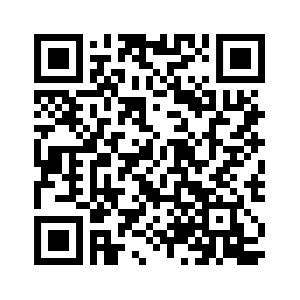
URL Link: https://uhs.tamu.edu/mental-health/student-support.htmlhttps://mentalhealth.tamu.edu/
Additional Resources
Additional Resources are available to assist with teaching effectiveness, compliance, and explanations for rules that govern faculty and student rights and responsibilities. Many of these are linked from the Howdy portal under the "faculty/teaching" tab:
- Academic Support Resources: https://www.tamu.edu/academics/support.html
- Faculty Affairs: https://facultyaffairs.tamu.edu
- Center for Teaching Excellence: https://cte.tamu.edu
- Learning Management System (Canvas): https://lms.tamu.edu
- Student Rules: https://student-rules.tamu.edu
- Aggie Honor System Office: https://aggiehonor.tamu.edu
- Catalogs: https://catalog.tamu.edu
- Final Exam Schedule: https://aggie.tamu.edu/registration-and-records/classes/final-examination-schedules
- Academic Calendar: https://registrar.tamu.edu/academic-calendar/